You Know the Tech, but Don't Know What Agent Product to Build? I Found a Framework from 3 Case Studies
I used to have a very real dilemma.
I knew some tech — could call models, write prompts, and understood concepts like RAG, Agents, and workflows. But when it came to actually building a product or starting an open-source project, I got stuck.
Not because I couldn't write code, but because I didn't know what to build.
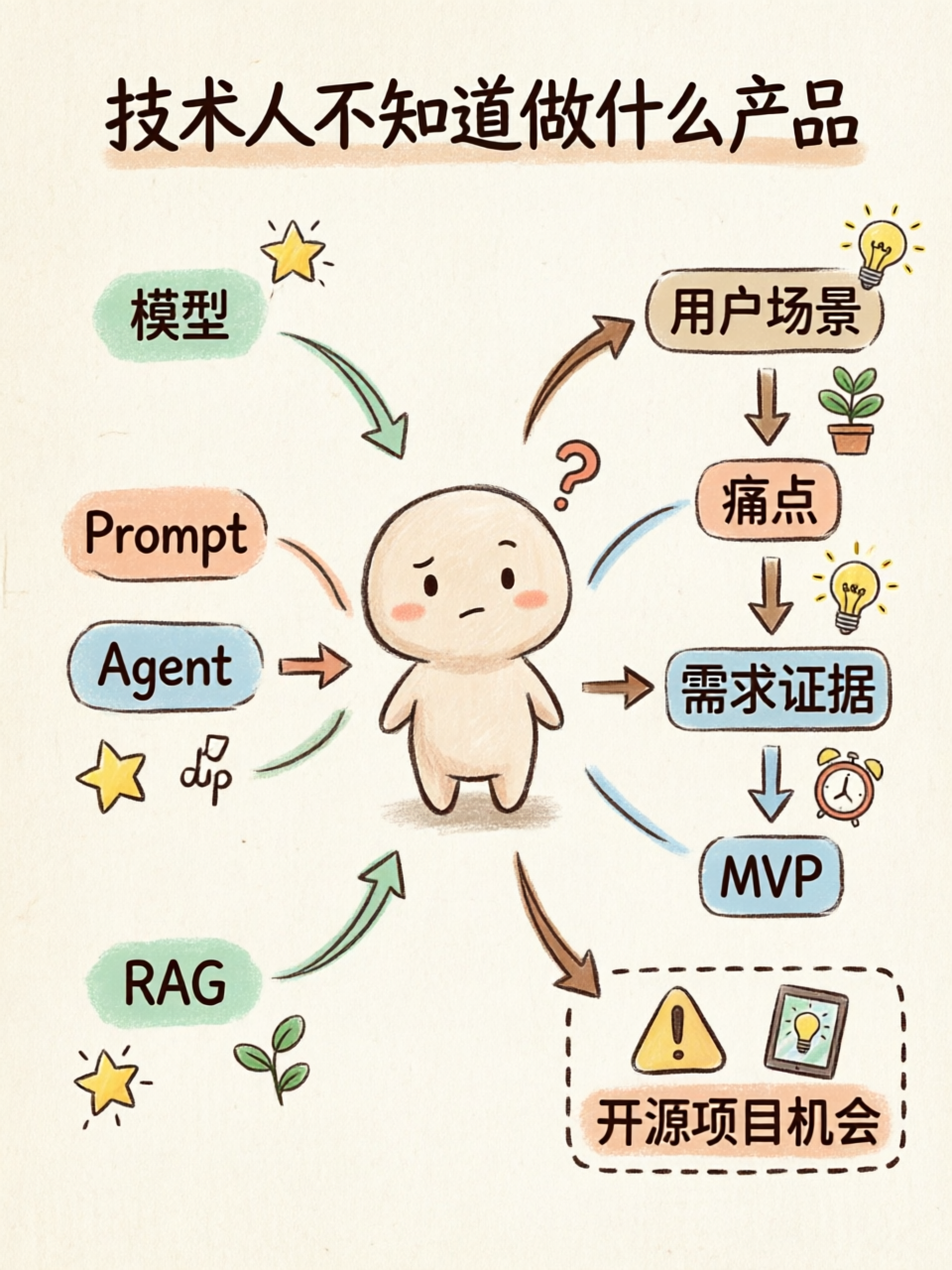
This state is very common. When many technical people start an Agent project, their first instinct is to start from what they know:
- I can call LLM APIs, so I'll build a chatbot.
- I know RAG, so I'll build a knowledge base Q&A.
- I know Agents, so I'll build an automated task assistant.
- I know workflows, so I'll build a node orchestration tool.
None of these directions are wrong, but they easily become a "technology showcase." It looks complete, but no one actually uses it.
When I later read "Agent Product Case Study Deep Dive.pdf," one point struck me:
Building an Agent product shouldn't start from technology and work backward to the product. It should start from the user scenario and work backward to the technology.
This sounds like common sense, but it's easy to forget when you're actually building something.
Users don't care what framework you used. What they care about is: In what scenario did you save me time, reduce my hassle, or help me accomplish something that was previously hard to do?
01 Don't Ask "What Can I Do?" First Ask "Where Is the User Stuck?"
A technologist's default is to start from capability.
I know X, so I can do Y.
But products don't grow that way. Products grow from specific problems.
For example:
- A user has to repeatedly organize the same materials every week;
- A developer constantly toggles between documentation and code;
- A PM has to extract requirements from comments, tickets, and interviews;
- An operations person has to monitor competitors and user feedback;
- An open-source maintainer faces the same repetitive Issues every day;
- Team knowledge is scattered across Feishu, Notion, GitHub, Slack — nobody can find it all.
These are the places where it makes sense to ask: Can an Agent help?
Not "I have Agent technology, so let me find somewhere to use it," but "This task is inherently tedious — can an Agent make it simpler?"
I think this is the first line that separates an AI Demo from an AI Product.
An AI Demo showcases capability.
An AI Product solves a task.
02 The 2D Framework from the PDF: First Judge Whether the Scenario Is Worth Doing
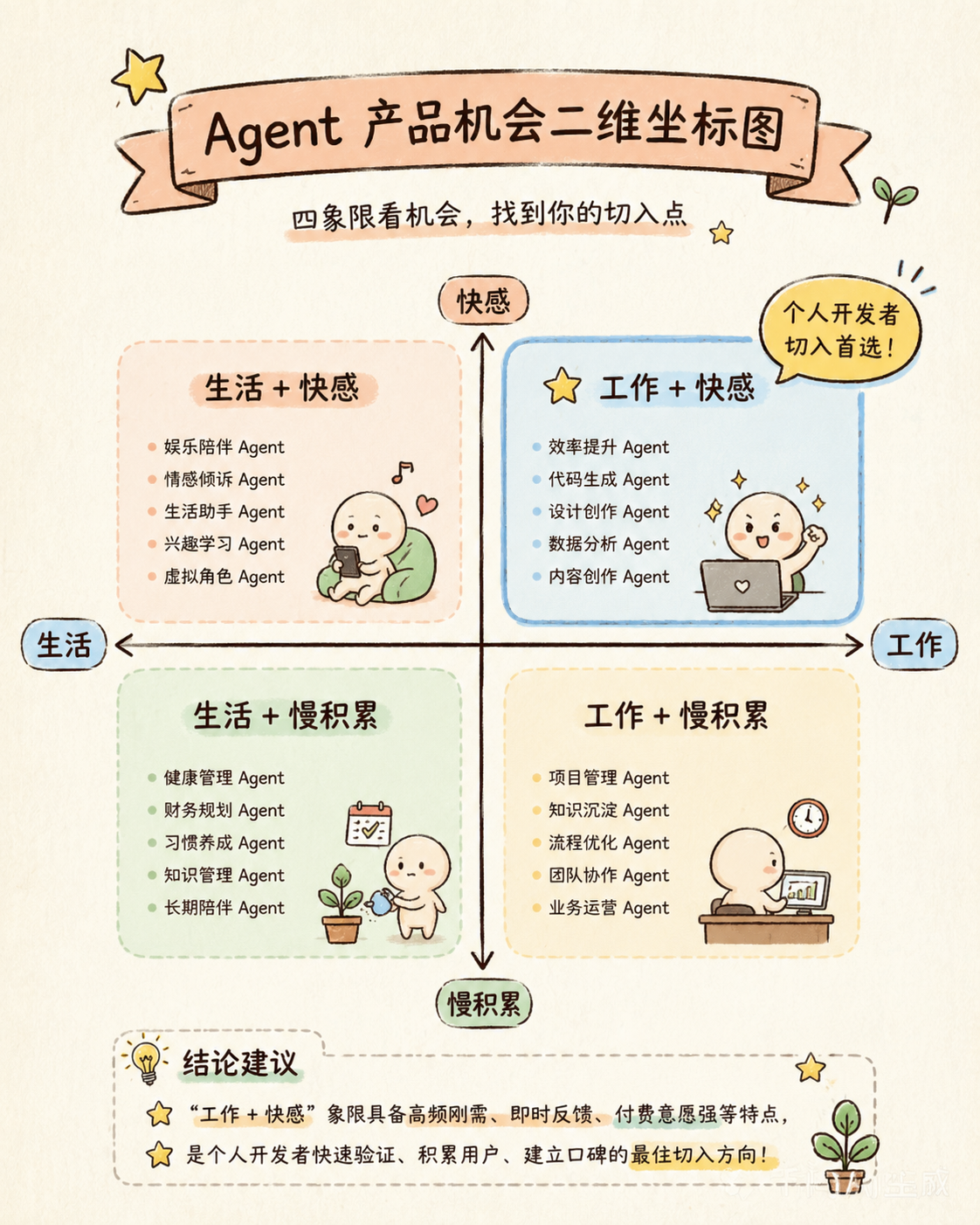
The document has a 2D framework for judging Agent product opportunities, which I think is excellent for choosing a direction.
It splits scenarios along two axes:
- Work / Life
- Slow Accumulation / Instant Gratification
Combined, they form four types of opportunities:
| Scenario | Typical Direction | My Assessment |
|---|---|---|
| Work + Instant Gratification | Automation, efficiency, code, data analysis, knowledge base Q&A | Best for individual developers to start with; value is easily perceived |
| Work + Slow Accumulation | Learning, training, knowledge management, experience building | Has long-term value, but retention is harder |
| Life + Instant Gratification | Entertainment, companionship, creation, role-playing | Easy to spread, but monetization may be unstable |
| Life + Slow Accumulation | Health, habits, growth, long-term companionship | High trust barrier, high product experience requirements |
If you're like me — technically inclined and wanting to do an open-source project — I'd suggest starting with the "Work + Instant Gratification" quadrant.
The reason is straightforward.
Pain points in work scenarios are easier to observe. How the user currently does things, where they're slow, where they make mistakes, where they resort to copy-paste — these can usually be uncovered through questions. And whether the outcome is good is also easier to judge.
For example, an Agent that helps developers analyze API documentation — users can immediately tell if it found the right endpoints.
An Agent that helps PMs organize user feedback — whether it accurately surfaces real高频 issues can be validated relatively quickly.
These scenarios may not be the sexiest, but they're better for building that first useful thing.
03 Rizz: ToC Needs Are Often Not "Big Problems" but "Small Situations"
The first case study in the PDF is Rizz.
This product is interesting. It's not a "help you complete complex workflows" tool. Instead, it cuts into the very specific scenario of social expression.
The user's problem isn't grand:
- Not knowing how to reply;
- Not knowing how to start a conversation;
- Afraid of saying something awkward;
- Wanting some immediate feedback;
- Wanting to feel more natural in social situations.
These needs seem small, but that doesn't mean they're unimportant.
Many ToC products come from these kinds of "small situations." The user isn't looking to buy a complex system — they just want something to help them in a specific moment.
This is a reminder for building Agent products:
ToC needs may not surface directly through traditional interviews. If you ask a user "Do you need a social reply Agent?" they might say no. But if you look at Xiaohongshu, Reddit, Product Hunt, or app store reviews, you'll find many people expressing similar anxieties.
So ToC need-finding is more like exploration.
You should look at:
- What are users complaining about on social platforms?
- What scenarios are younger users asking for help in?
- Which old products could be rebuilt with AI?
- Which previous-generation tools solved things awkwardly?
- Which needs couldn't be addressed before, but current model capabilities刚好 suffice?
The document summarizes several approaches:
- 10x improve an old product;
- Rebuild old scenarios with new technology;
- Find problems that previous-generation tech couldn't solve well;
- Create new demand.
My takeaway is: ToC Agents shouldn't start with a "big, all-purpose assistant." Too big, and users won't know why they need it.
Instead, start from a very narrow moment.
Help users write the first sentence. Help them fix an awkward expression. Help them simulate an interview. Help them practice a language. Help them handle a specific type of high-frequency social scenario.
The point here isn't how smart the AI is — it's whether it saves the user trouble in that specific moment.
04 Chat2API: Agents Are Best Suited for "Goal-Oriented, Information-Rich, Multi-Step" Tasks
The second case study is Chat2API.
This scenario is more developer-oriented and easier to break down.
The problem it solves: when developers face a large amount of API documentation, it's hard to quickly find the APIs that meet their needs and hard to judge how to combine them.
Why is this suitable for an Agent?
Because it's not simple Q&A.
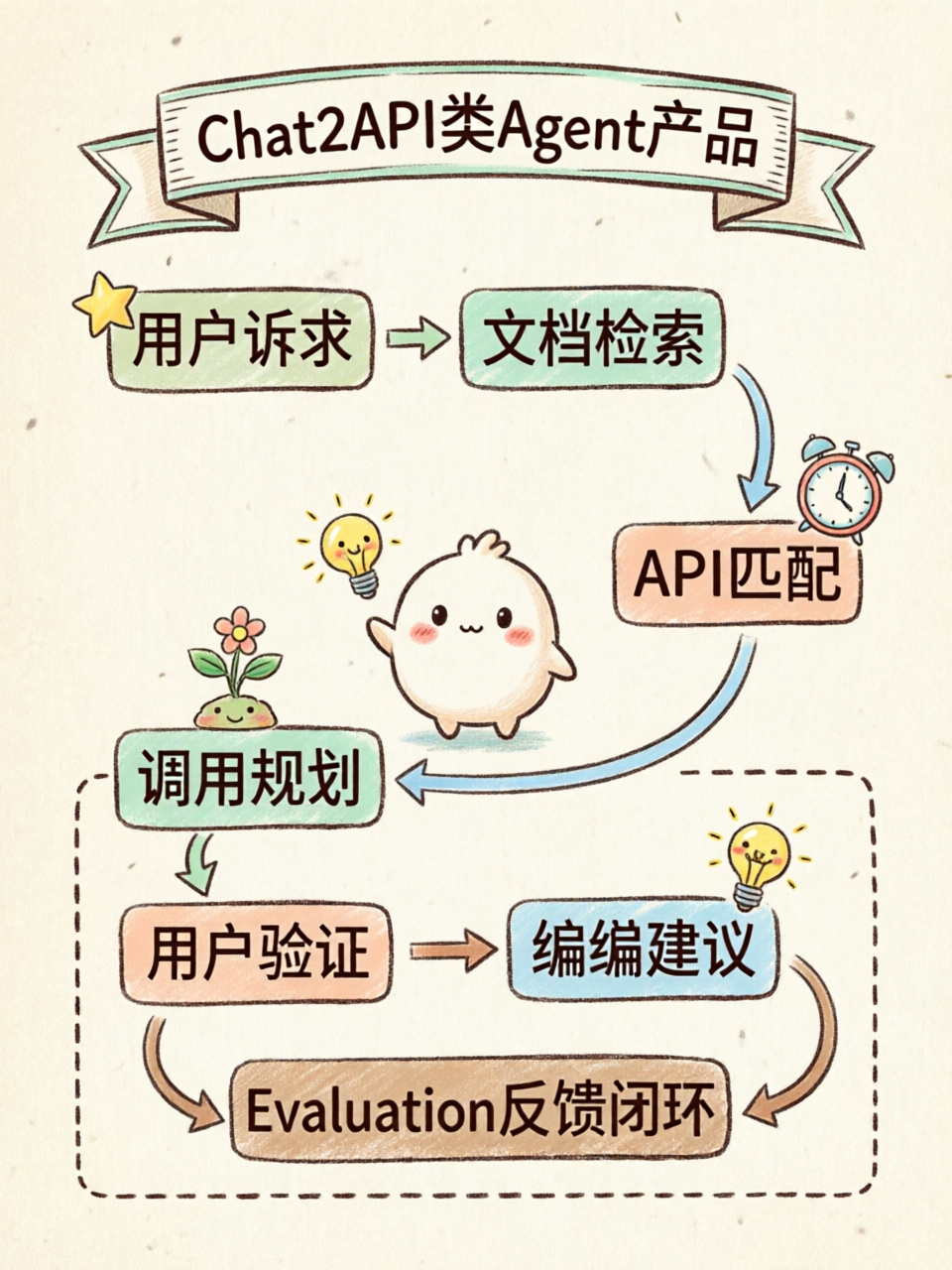
There's a complete task chain inside:
- User expresses a development need;
- System understands what the user actually wants to achieve;
- Retrieves from a large body of API documentation;
- Finds potentially relevant interfaces;
- Judges how these interfaces work together;
- Provides call order and编排 suggestions;
- User then develops and validates based on the suggestions.
See, this is very different from a regular Chatbot.
A Chatbot is more like "you ask, I answer."
An Agent is more like "I understand your goal, then I search materials, select tools, arrange steps, and deliver a solution."
So when building Agent products, I now first check whether a task has these characteristics:
- A clear goal;
- Requires searching through materials;
- Needs to span multiple information sources;
- Requires judgment and trade-offs;
- Needs to generate an executable result;
- The result still needs user validation.
If all these conditions are met, it's a good candidate for an Agent.
Chat2API also has another important point: it doesn't end once you connect the model.
The document breaks product deployment into three layers:
| Layer | Problem It Addresses |
|---|---|
| Agent capability / Prompt engineering | Enables the system to plan, call tools, and maintain context |
| Model capability | Determines the ceiling of understanding and generation quality |
| Evaluation | Determines whether the output actually meets user needs |
What I want to emphasize most here is Evaluation.
Many AI products early on have the illusion that if it looks good in a demo, the product is usable.
But Agent products can't be judged this way.
You need to ask more specifically:
- Did it find the right API?
- Did it miss any necessary parameters?
- Is the call order correct?
- How much does the user still need to change after getting the result?
- How much development time did it actually save?
- When it's wrong, where does it go wrong?
These questions all need to go into the evaluation set.
Otherwise, you have no idea whether the product is getting better or just finding new ways to hallucinate.
05 Cursor: Don't Make Your Agent an Island — Embed It in the User's Workflow
The third case study is Cursor.
Cursor isn't just "AI writing code." What's really worth breaking down is why it was able to grow.
It didn't ask developers to leave their workflow.
Developers already write code, check context, modify files, debug, and refactor inside their IDE. What Cursor does is place Agent capabilities right next to these actions.
This is extremely important.
Many Agent products make one mistake: they build a complete standalone entry point, but users simply don't want to open another place.
When users are writing code, you ask them to go to another web page and copy-paste.
When they're reading comments, you ask them to export CSV first and then upload it.
When they're writing a PRD, you ask them to switch to another tool and reorganize materials.
All of these add friction.
What Cursor taught me is: the closer an Agent is to the user's task, the more likely it is to be used.
So when building a product, first ask:
- Where do developers work? IDE, GitHub, terminal.
- Where do PMs work? Documents, spreadsheets, Feishu.
- Where do operations people work? Comment sections, dashboards, data panels.
- Where do researchers work? Papers, notes, knowledge bases.
- Where do open-source maintainers work? GitHub Issues, PRs, Releases.
Put the Agent in these places — that's more practical than building a new "big platform."
There's another very practical point: Agent products don't need to wait until they're 100 points in the early stage.
The PDF has a line, roughly meaning "let a 60-point product swim in the shallow water." I agree.
The前提 is that the scenario you choose is small enough, the risk is可控, and users are willing to try.
Let real users start using it, then iterate based on feedback. That's more reliable than polishing behind closed doors for three months.
06 If You Really Want to Find Agent Product Opportunities, Follow This Path
After studying these three cases, I'd break Agent product need-finding into six steps.
Not the standard answer, but practical enough.
Step 1: Pick a Very Narrow Audience
Don't start with "everyone can use this."
Start with a specific group:
- Indie developers;
- Open-source maintainers;
- AI application developers;
- Product managers;
- Operations people;
- Data analysts;
- Teachers and trainers;
- Legal professionals;
- Salespeople.
Then ask one question:
What task does this person repeatedly deal with every week?
If you can't answer this, the project probably isn't ready to start.
Step 2: Find Real Tasks, Not Abstract Needs
Agents are suited for tasks that are:
- Multi-step;
- Information-heavy;
- Highly repetitive;
- Require judgment;
- Span across tools;
- Require context;
- Need modification and confirmation after output.
For example:
- Analyzing user comments;
- Organizing competitor negative reviews;
- Summarizing meeting minutes;
- Retrieving company knowledge base;
- Generating API call solutions;
- Analyzing open-source project Issues;
- Generating test cases from documentation;
- Compiling scattered materials into a report.
Don't ask "Does the user want to use AI?"
That question isn't meaningful.
Ask: "The last time you completed this task, where exactly were you stuck?"
Step 3: Gather Evidence
Every need should have evidence.
Evidence can come from:
- User quotes;
- GitHub Issues;
- Community discussions;
- G2 negative reviews;
- Product Hunt comments;
- Reddit / Hacker News;
- Search trends;
- Competitor feature gaps;
- User's existing workflow; -付费 behavior.
For ToC, look at:
For ToB or developer tools, look at:
- G2 AI Category
- Hacker News
- Similarweb
- Semrush
- GitHub Issues
These tools help you find signals, but they can't understand users for you.
Ultimately, you need to come back to those simple questions: Who is using it? What are they trying to accomplish? How do they do it now? Where does it hurt? Is it significantly better after an Agent介入?
Step 4: In Interviews, Don't Ask "Would You Use This?"
I used to make this mistake too.
I'd take an idea and ask people: "If I built an AI tool, would you use it?"
Most people would say "sure" or "sounds good."
And then you'd mistakenly think the need was validated.
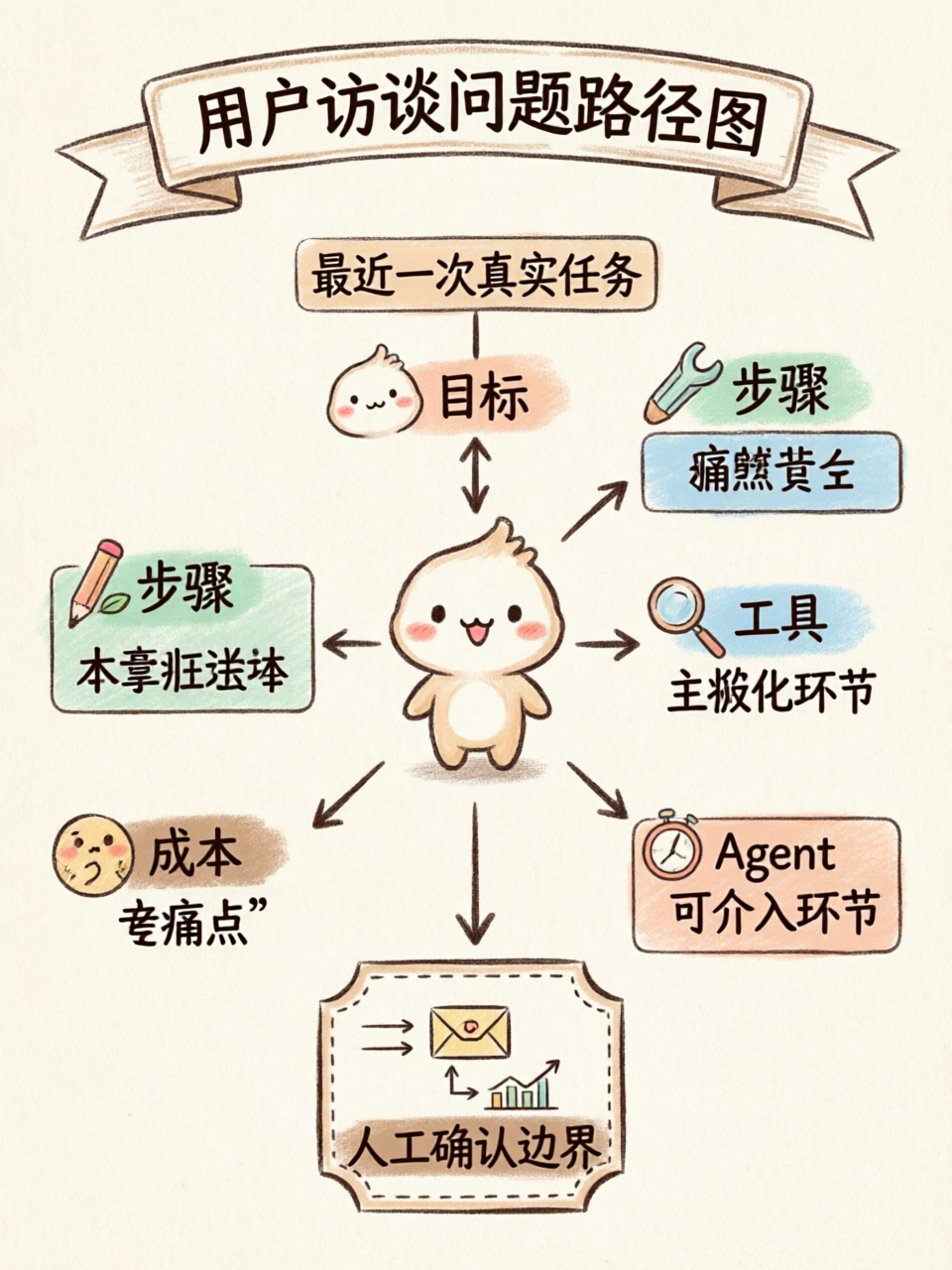
A better approach is to reconstruct the most recent real experience:
- When was the last time you dealt with this problem?
- What goal were you trying to accomplish?
- What steps did you take from start to finish?
- Which step was the slowest, most annoying, or most error-prone?
- What tools do you currently use?
- Where are you doing copy-paste?
- Which parts require manual judgment?
- If this task goes wrong, what are the consequences?
- If an Agent could help, which step would you most want it to take over first?
- Which actions must you confirm yourself?
User attitudes are unreliable. User behavior is more reliable.
Needs are usually hidden in behaviors.
Step 5: First Break Down Agent Capabilities, Then Write Feature Lists
Once you have the need, don't immediately write a feature list.
First break down the task.
What does this Agent actually need to do?
| Agent Capability | Corresponding Question |
|---|---|
| Planning | Does it need to understand the goal and break it into steps? |
| Tool Use | Does it need to call search, APIs, databases, code, or documents? |
| Action | Does it need to generate, modify, submit, send, or create? |
| Memory | Does it need to remember preferences, history, or business rules? |
For example, say you want to build a "Competitor Review Analysis Agent."
It might not be a simple summarization tool. It might need to:
- Collect reviews from G2, Product Hunt, App Store;
- Identify negative review themes;
- Cluster user pain points;
- Extract user quotes;
- Generate product opportunity reports;
- Remember which competitors and industries you care about.
Once you break it down this way, features naturally emerge.
Otherwise, it's too easy to end up with "add one more summary, add one more export, add one more chat box."
Step 6: Build Evaluation Early
One annoying thing about Agent products: the output is unstable.
With regular software, as long as the logic is fixed, testing is relatively straightforward. Agents are different — they might answer well today, then go off track with a different input tomorrow.
So you need to build Evaluation from the early stages.
A simple evaluation set is enough:
- User input;
- Context materials;
- Expected output;
- Judgment criteria;
- User feedback;
- Failure reasons.
Metrics don't need to be complex initially. Start with:
- Task completion rate;
- Number of user modifications;
- Tool call success rate;
- First-attempt usable output ratio;
- Average time saved;
- User approval pass rate.
Don't just look at "does the answer sound right."
Look at "can the user actually use it."
07 If the Goal Is an Open-Source Project, How Should You Choose?
If you're not building a commercial product but an open-source project, I'd narrow the criteria further.
Open-source projects are better suited for these directions:
- Users are developers or technical teams;
- There's a self-hosting need;
- There's a need for plugin and extension support;
- Commercial products are too heavy or too expensive;
- Users are willing to deploy themselves;
- The community can contribute templates, data sources, plugins, or evaluation sets.
You can follow this process:
First, pick a group you know well.
For example: developers, open-source maintainers, AI application teams, PMs, operations people.
Second, find their high-frequency tasks.
Developers: reference documentation,修改 code, debug bugs.
Maintainers: process Issues, write Release Notes.
PMs: analyze user feedback, organize PRDs.
Operations: analyze comments, generate topics.
AI application teams: run evaluations, tune prompts, investigate Agent failures.
Third, look at where existing solutions are uncomfortable.
Too expensive, too heavy, not open-source, hard to deploy, hard to integrate, poor documentation, no localization support, no private data support, or requiring大量 manual work.
Fourth, build the smallest MVP.
Don't build a complete platform from the start.
CLI, browser extension, single-scenario workflow, Feishu/Slack/Discord bot, README + Demo, Prompt Demo — all viable options.
What you need to validate isn't whether the feature set is comprehensive, but whether users will bring real tasks to try it.
08 A GitHub Issue Analysis Agent, Just as an Example
Here's an example, but it's not the主角.
Suppose the target users are open-source maintainers, or indie developers looking for an open-source project direction.
They have a real task:找出高频 pain points and product opportunities from大量 GitHub Issues.
How do they do it now?
Manually.
The problems are obvious:
- Too slow;
- Information too scattered;
- Hard to cluster;
- Hard to judge which needs are high-frequency;
- Hard to distill new project opportunities from Bugs, Features, Docs, and Deployment.
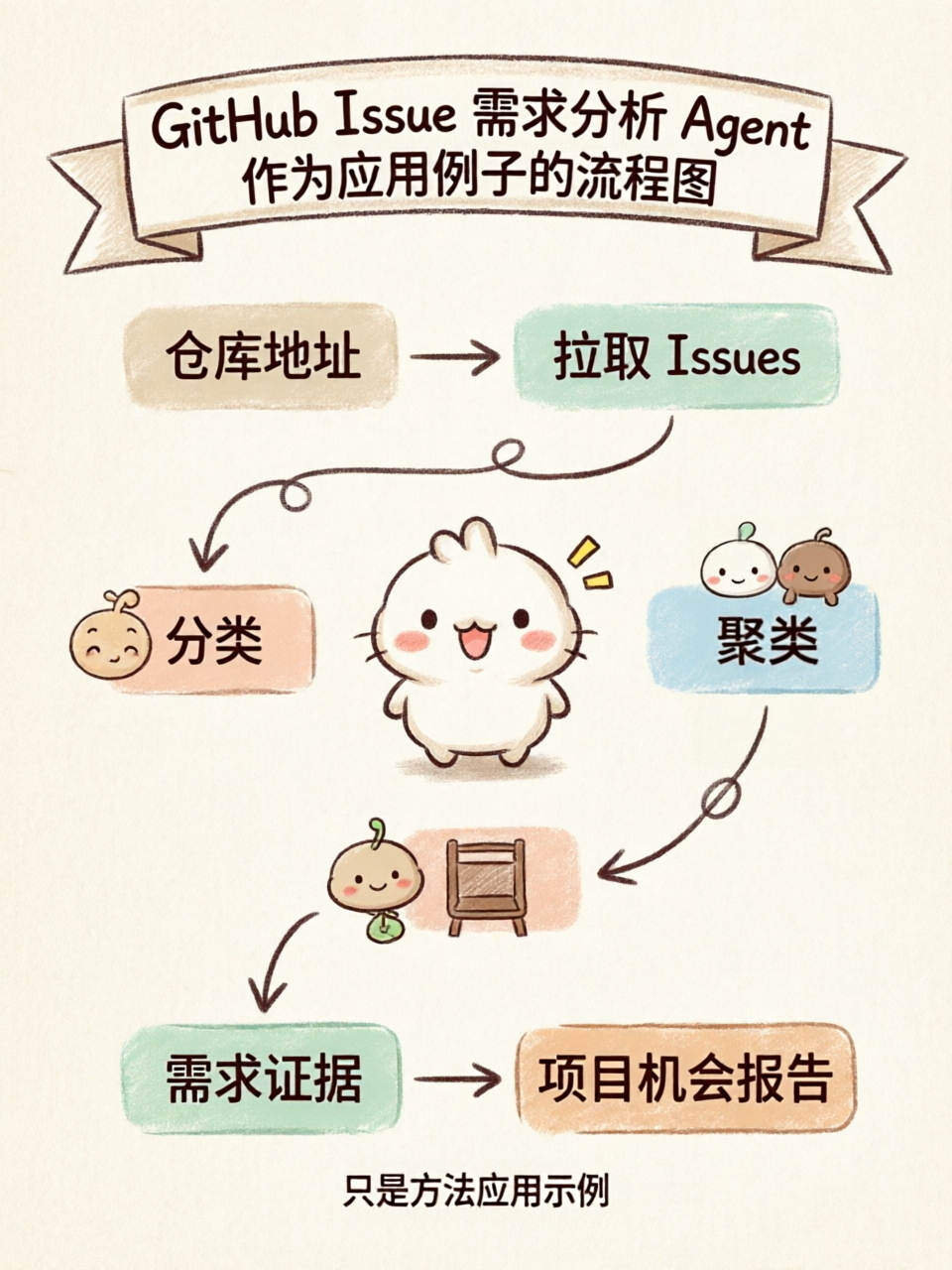
So you could build a small Agent:
Input a GitHub repository URL, automatically analyze Issues, output user pain points,需求 classification, evidence excerpts, and potential project opportunities.
The first version doesn't even need a web UI.
A CLI is enough:
issue-radar analyze https://github.com/open-webui/open-webuiOutput a Markdown report:
# Issue Requirements Analysis Report

## High-Frequency Problems

1. Deployment and environment configuration
2. Local model connection
3. User permission management
4. Plugin extensions
5. Insufficient documentation and tutorials

## User Quotes

> "I followed the docker setup but still cannot connect to Ollama."

## Potential Project Opportunities

### Ollama Connection Diagnostic Tool

Target users: Local LLM users

Pain point: Model connection fails but reason unknown

MVP: Detect Ollama service, port, model list, API availability
The point of this example isn't "build a GitHub tool."
The point is the method:
Start from a real task, figure out how users currently do it, then judge which steps an Agent can take over.
The corresponding Agent capabilities are clear:
- Planning: determine the analysis steps;
- Tool use: call the GitHub API;
- Action: classify, cluster, generate reports;
- Memory: remember the user's areas of interest and analysis preferences.
09 How I Would Find the Next Agent Project
If I were to find a new Agent open-source project direction, I'd likely do this.
First, pick a group I know well, like developers or PMs.
Then, continuously look at their real feedback for a week: GitHub Issues, G2 negative reviews, Product Hunt comments, Reddit discussions, complaints in group chats.
Don't rush to写 code. First record 50 pain points.
Write each one clearly:
- Who is the user;
- What scenario are they in;
- How do they do it now;
- Where is the trouble;
- How frequent is it;
- Is there an existing alternative;
- Can an Agent明显 improve it;
- Can you build a very small MVP.
Only if a certain type of pain point appears 5+ times would I consider starting.
And when I start, I don't build a complete product — I build the smallest version first. It could be a CLI, a browser extension, or even just a semi-automated script.
Then find 5 real users to try it.
If they're willing to bring real tasks to use it, then it's worth pursuing.
10 Final Thoughts
Knowing tech but not knowing what product to build — that's not something to be ashamed of.
Many times, it's not that you don't have enough technical skill — it's that you haven't placed your tech into real tasks yet.
Agent products especially can't stop at "model + chat box."
A better understanding is: an Agent is a task system围绕用户目标, performing planning, tool use, action, and memory.
So when looking for方向, don't first ask:
What technology do I know, so what can I build?
First ask:
Which type of user is repeatedly dealing with a tedious task? Can I use an Agent to build a simpler, more open, more extensible solution?
Rizz reminds us that ToC needs might be hidden in very small situations.
Chat2API reminds us that Agents are suited for goal-oriented, information-rich, multi-step tasks.
Cursor reminds us that products should embed themselves in the workflows users already use.
Connect these three points, and your方向 becomes much clearer.
Not through inspiration, not through stacking technology.
But by digging needs out of real tasks.
References
Copyright
Copyright Ownership:
License under:Attribution 4.0 International (CC-BY-4.0)