
Learn Claude Code (Part 1): Write an Agent Loop from Scratch — Less Than 200 Lines to Run the Full Model + Tools Pipeline
Many people talk about Agents every day, but they don't actually understand how the core "loop" really works.
This article walks you through writing a minimal working Agent Loop from scratch. No LangChain, no CrewAI — just the OpenAI SDK + a while True, running the complete cycle of "model thinks → calls a tool → gets the result → continues reasoning."
01 Who Is This Article For?
- You know LLMs can do Function Calling, but you've never built a complete Agent loop yourself
- You're curious about "how does the model decide when to call a tool vs. when to answer directly"
- You want to understand the data flow of Tool Calling in streaming mode
- You want to embed a minimal Agent in your own project without heavy frameworks
Not for:
- You need a production-grade Agent framework (check out LangGraph, CrewAI)
- You don't want to touch any code
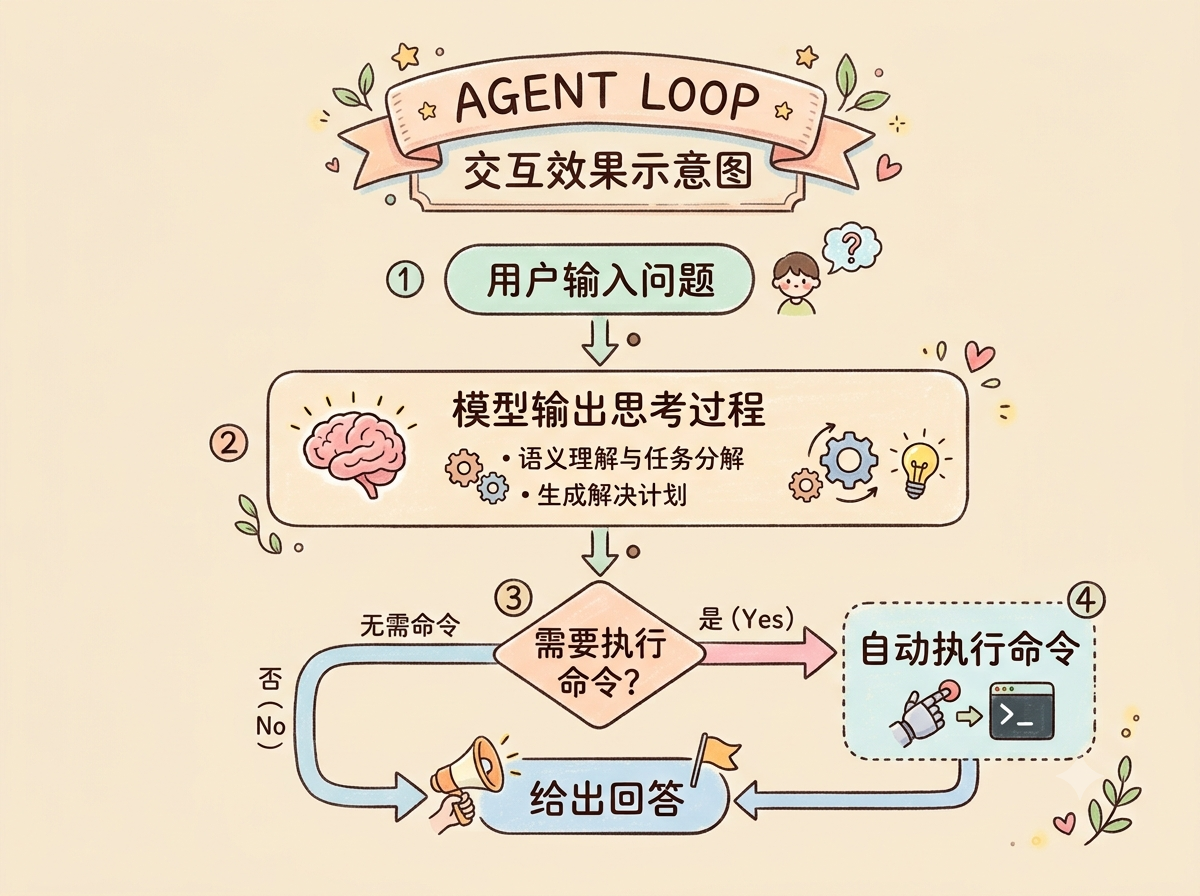
02 What Does the Final Result Look Like?
After running the script, you'll get an interactive terminal:
s01 >> Show me what files are in the current directoryWhen the model receives the question:
- It decides it needs to run a Shell command
- Outputs the command to run (you'll see
$ lsin the terminal) - Executes the command and gets the result
- Continues reasoning based on the command output to give a human-readable answer
- Streams the answer token by token
The entire loop is fully automated. You just input questions — the model decides:
- Whether to call a tool
- Which tool to call
- How to continue after the tool returns
03 What Do You Need to Prepare?
Minimal requirements:
| Item | Description |
|---|---|
| Python | 3.9+ |
| API | Any LLM API compatible with the OpenAI SDK (this article uses DeepSeek) |
| Dependencies | openai, python-dotenv |
Install dependencies:
pip install openai python-dotenvEnvironment variables (.env file):
DEEPSEEK_API_KEY=sk-your-key-here
DEEPSEEK_BASE_URL=https://api.deepseek.com/v1
DEEPSEEK_MODEL=deepseek-chat
Using other models is the same — just change the base_url and model name.
04 What Does the Project Structure Look Like?
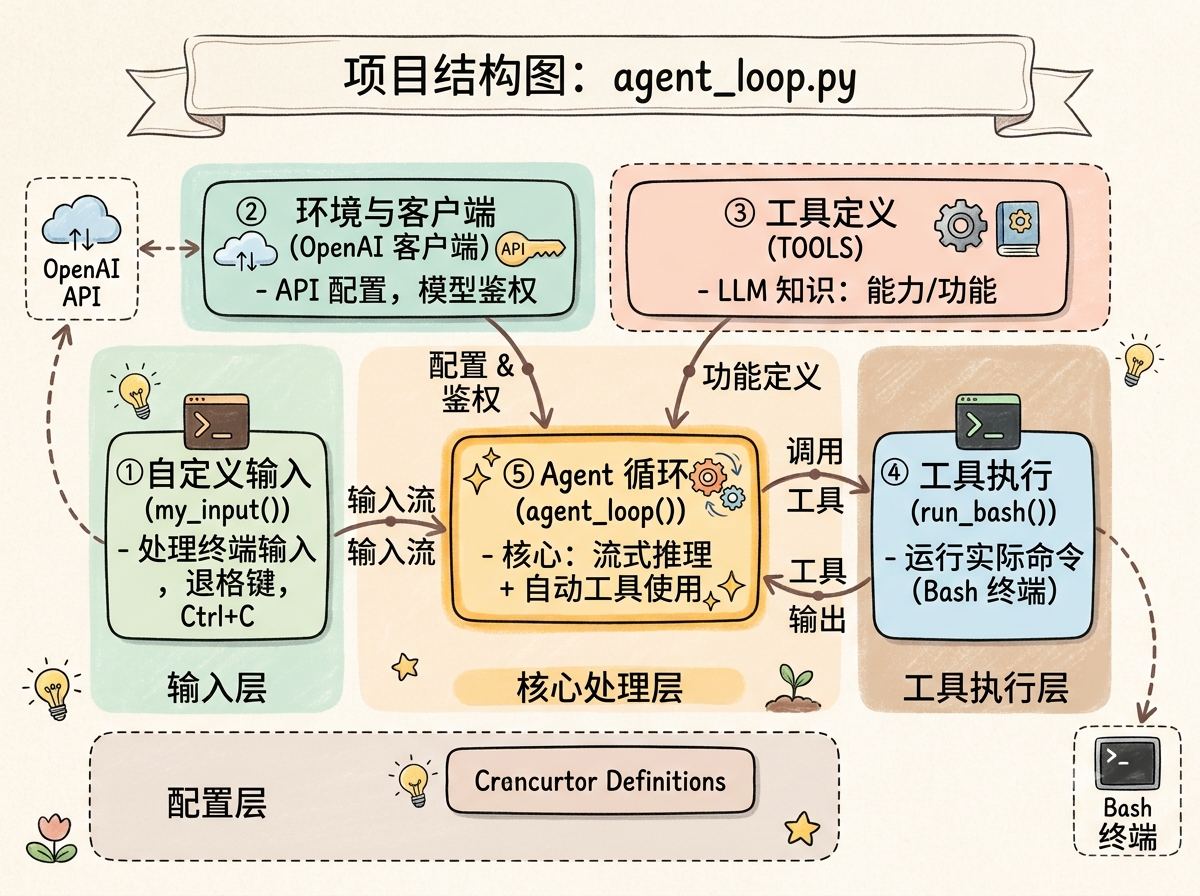
The entire script is a single file, but we can break it into 5 modules:
agent_loop.py
├── ① Custom input function  my_input()       # Handle terminal input (backspace, Ctrl+C)
├── ② Environment & client    OpenAI client    # API configuration
├── ③ Tool definitions        TOOLS            # Tell the model what it can call
├── ④ Tool execution          run_bash()       # Where commands actually run
└── ⑤ Agent loop              agent_loop()     # Core: streaming reasoning + auto tool calling
Let's break them down one by one.
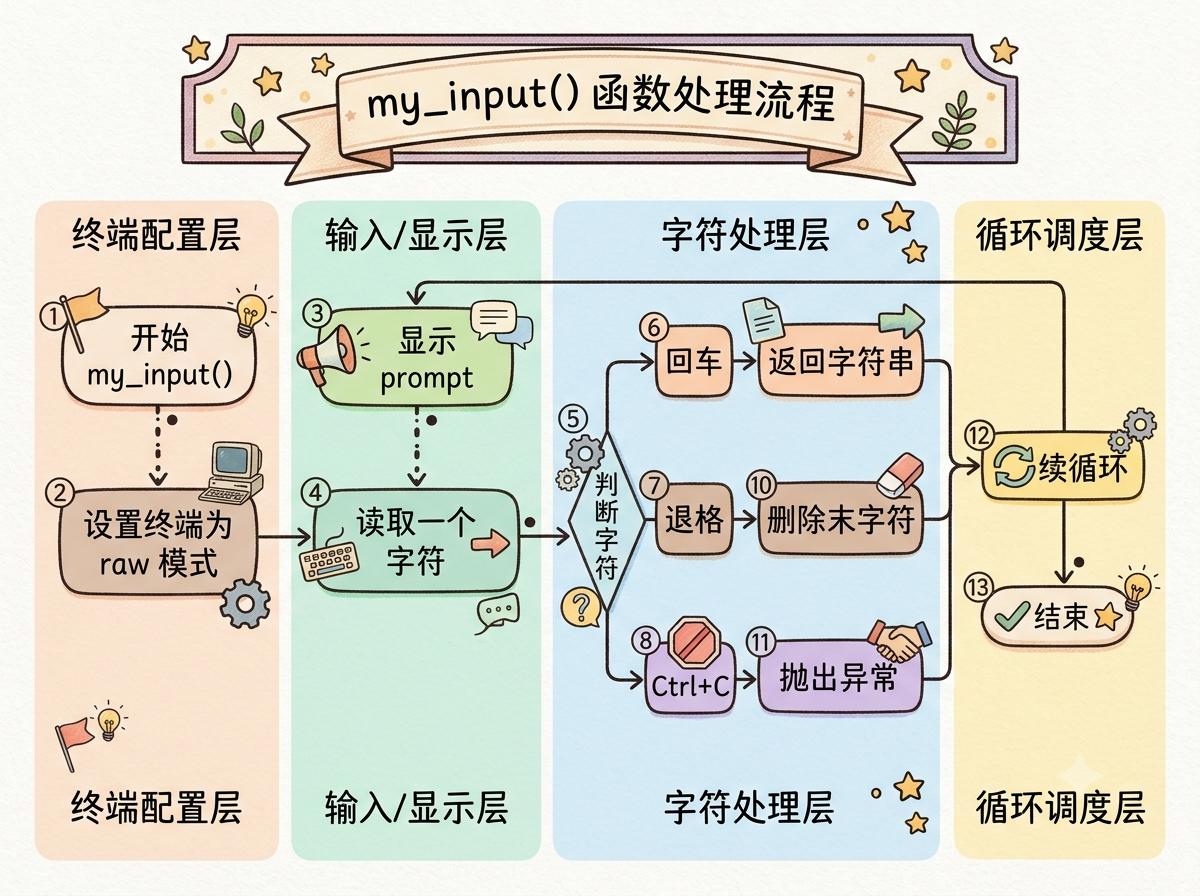
05 Step 1: Custom Terminal Input
Why is this needed?
Python's built-in input() function doesn't handle the Backspace key properly in the terminal — pressing backspace shows ^H instead of deleting the character.
So we implement our own my_input():
def my_input(prompt: str = "") -> str:
    # Set terminal to raw mode (read characters one at a time)
    # Handle: Enter to confirm, Backspace to delete, Ctrl+C to interrupt
    # Automatically restore terminal settings on exit
Key points:
tty.setraw(fd)puts the terminal in "raw mode," reading each keypress immediately- Only ends input on
\ror\n - On
\x7f(DEL) or\x08(BS), remove the last character from the buffer and output\b \b - Uses
try/finallyto ensure the terminal is restored even on errors
This step isn't core to the Agent, but it's the engineering detail that makes a CLI tool pleasant to use.
06 Step 2: Environment Configuration and Model Client
Simple but important:
load_dotenv()  # Load API Key from .env

client = OpenAI(
    api_key=os.getenv('DEEPSEEK_API_KEY'),
    base_url=os.getenv('DEEPSEEK_BASE_URL')
)

MODEL = os.getenv("DEEPSEEK_MODEL")
Then use a system prompt to tell the model its role:
SYSTEM = f"You are a coding agent at {os.getcwd()}. Use bash to solve tasks. Act, don't explain."This is key — Act, don't explain biases the model toward calling tools directly rather than producing lengthy explanations.
07 Step 3: Tell the Model What Tools It Can Use
This step defines the Agent's "capability boundary." We give the model just one tool — running Shell commands:
TOOLS = [{
    "type": "function",
    "function": {
        "name": "bash",
        "description": "Run a shell command.",
        "parameters": {
            "type": "object",
            "properties": {
                "command": {"type": "string"}
            },
            "required": ["command"],
        },
    },
}]
How much an Agent can do depends on how many tools you give it. This is where Tool Calling begins.
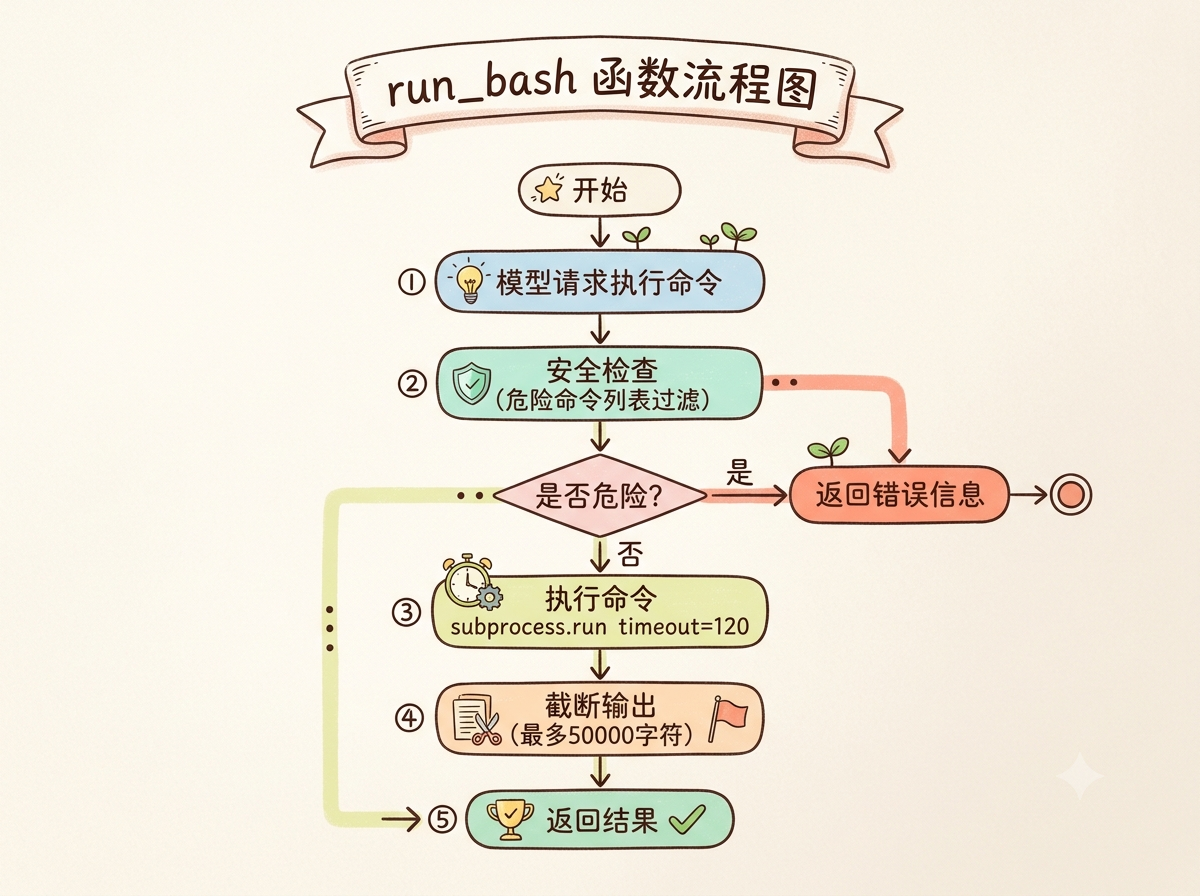
08 Step 4: Safely Execute Shell Commands
The model says "I want to run this command," but you can't let it do whatever it wants.
run_bash() does two things:
First, safety filtering:
# Block dangerous commands
dangerous = ["rm -rf /", "sudo ", "shutdown ", "reboot ", ...]
if any(d in command.lower() for d in dangerous):
    return "Error: Dangerous command blocked."
It even maintains separate dangerous command lists for Linux and Windows.
Second, execute and return results:
r = subprocess.run(cmd, shell=True, capture_output=True, text=True, timeout=120)
out = (r.stdout + r.stderr).strip()
return out[:50000] if out else "No output."
Key details:
timeout=120— prevents commands from hanging- Output truncated to 50000 characters — prevents the model from being overwhelmed by excessively long output
09 Step 5: The Core — Agent Loop
This is the soul of the entire article.
def agent_loop(messages: list):This function is only about 50 lines, but it's a complete ReAct loop.
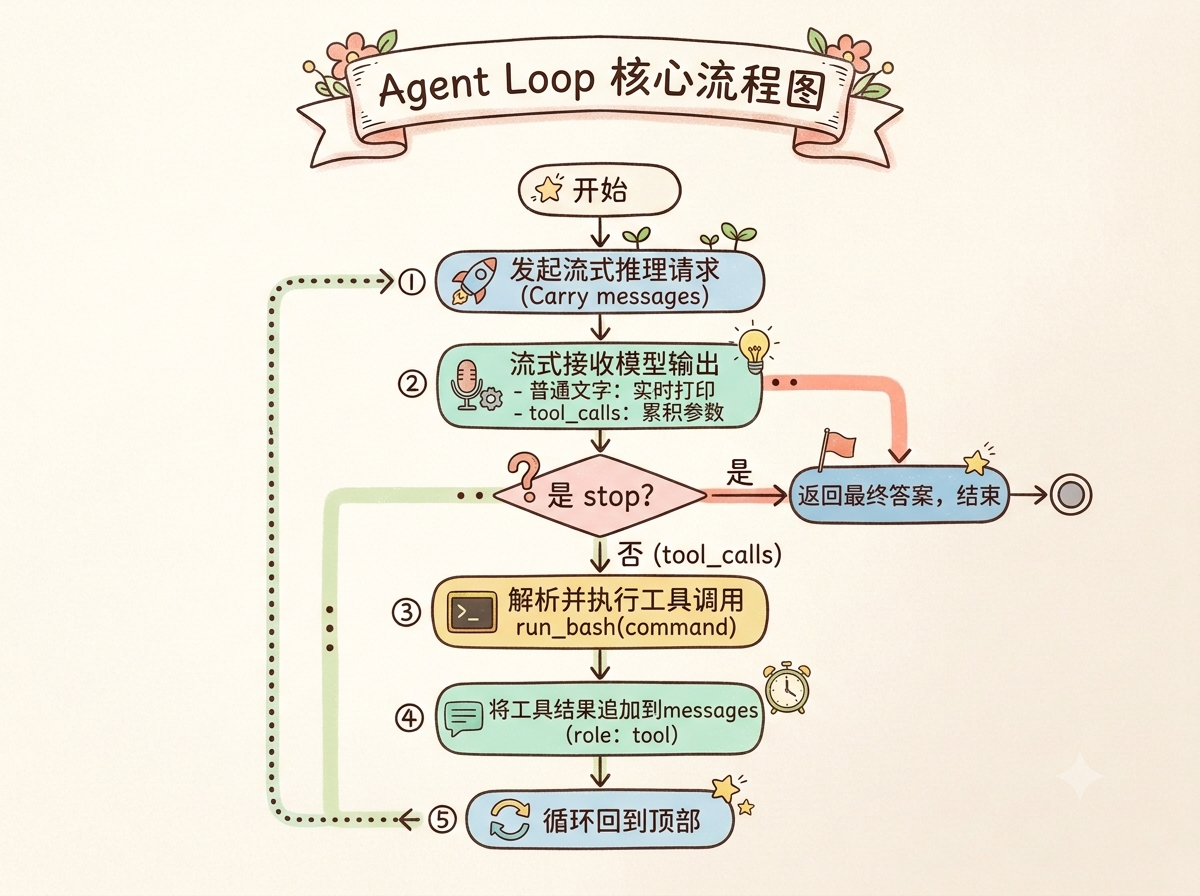
How Does the Loop Run?
The entire process can be broken into four steps:
① Send a reasoning request (Stream mode)
    ↓
② Stream the model's output (normal text or Tool Calling instructions)
    ↓
③ Check finish_reason
   ├─ "tool_calls" → execute the tool, append result to messages, continue looping
   └─ "stop"       → return the final answer, done
Let's focus on streaming Tool Calling:
When the model decides to call a tool, it returns tool_calls delta data instead of regular content:
for chunk in stream:
    delta = chunk.choices[0].delta

    # Stream normal text
    if delta.content:
        print(delta.content, end="", flush=True)

    # Accumulate Tool Calling parameters
    if delta.tool_calls:
        tool_call_deltas[idx]["function"]["arguments"] += tc.function.arguments
This is streaming Function Calling — the model "thinks" about parameters while you receive fragments, eventually assembling the complete JSON.
Determining the Loop Direction
if finish_reason != "tool_calls":
    return  # Model says it's done, stop

# Otherwise, execute tools and continue
results = []
for tc in assistant_msg.get("tool_calls", []):
    args = json.loads(tc["function"]["arguments"])
    output = run_bash(args["command"])
    results.append({"role": "tool", "tool_call_id": tc["id"], "content": output})

messages.extend(results)
The core logic: as long as the model returns finish_reason="tool_calls", execute the tool, append the result, and continue the loop.
10 Step 6: Tie Everything Together
The main function is straightforward:
history = []
while True:
    query = my_input("s01 >> ")
    if query.strip().lower() in ("q", "exit", ""):
        break
    history.append({"role": "user", "content": query})
agent_loop(history)- User types a question
- It's added to the message history
- The Agent Loop starts
- After the loop ends, the model's final answer is printed
- Wait for the next question
11 Running and Testing
After starting, you'll see:
s01 >> Show me the current directoryThe model will:
- Call the
bashtool to executepwd(you'll see the yellow-highlighted$ pwd) - After getting the output, continue reasoning and tell you the current directory
- Stream the final answer
You can also try:
s01 >> Create a test.txt file and write "Hello Agent Loop" into itThe model will automatically run: echo "Hello Agent Loop" > test.txt
You'll see the yellow
$ echo "Hello Agent Loop" > test.txtexecuting, then the model tells you "done."
12 Complete Code
Here's the full agent_loop.py code, ready to save and run:
import os
import sys
import atexit
import subprocess

# ── Custom input function (avoids backspace issues entirely) ──
def my_input(prompt: str = "") -> str:
    import termios
    import tty

    if not sys.stdin.isatty():
        return input(prompt)

    sys.stdout.write(prompt)
    sys.stdout.flush()

    fd = sys.stdin.fileno()
    old = termios.tcgetattr(fd)
    buf: list[str] = []

    try:
        tty.setraw(fd)
        while True:
            ch = sys.stdin.read(1)
            if ch in ("\r", "\n"):
                sys.stdout.write("\r\n")
                break
            if ch == "\x03":
                raise KeyboardInterrupt
            if ch == "\x04":
                raise EOFError
            if ord(ch) in (127, 8):
                if buf:
                    buf.pop()
                    sys.stdout.write("\b \b")
            else:
                buf.append(ch)
                sys.stdout.write(ch)
            sys.stdout.flush()
    finally:
        termios.tcsetattr(fd, termios.TCSADRAIN, old)

    return "".join(buf)


atexit.register(lambda: None)


from openai import OpenAI
from dotenv import load_dotenv

load_dotenv()

client = OpenAI(
    api_key=os.getenv('DEEPSEEK_API_KEY'),
    base_url=os.getenv('DEEPSEEK_BASE_URL')
)

MODEL = os.getenv("DEEPSEEK_MODEL")

SYSTEM = f"You are a coding agent at {os.getcwd()}. Use bash to solve tasks. Act, don't explain."

TOOLS = [{
    "type": "function",
    "function": {
        "name": "bash",
        "description": "Run a shell command.",
        "parameters": {
            "type": "object",
            "properties": {"command": {"type": "string"}},
            "required": ["command"],
        },
    },
}]

def run_bash(command: str) -> str:
    dangerous = [
        "rm -rf /", "sudo ", "shutdown", "reboot", "> /dev/sd",
        "dd if=", "mkfs", ":(){", "chmod 777 /", "poweroff",
        "halt", "init 0", "init 6",
    ]
    if os.name == "nt":
        dangerous = [
            "del /f /s", "rd /s /q", "format ", "diskpart",
            "shutdown", "reg delete", "net user", "taskkill /f",
        ]

    if any(d in command.lower() for d in dangerous):
        return "Error: Dangerous command blocked."

    try:
        if os.name == "nt":
            shell = "powershell.exe"
            cmd = (
                "$OutputEncoding = [Console]::OutputEncoding = "
                "[System.Text.Encoding]::UTF8; " + command
            )
        else:
            shell = "/bin/bash"
            cmd = command

        r = subprocess.run(
            cmd, shell=True, executable=shell,
            cwd=os.getcwd(), capture_output=True, text=True,
            encoding="utf-8", timeout=120,
        )
        out = (r.stdout + r.stderr).strip()
        return out[:50000] if out else "No output."
    except subprocess.TimeoutExpired:
        return "Error: Command timed out (120s)."
    except (FileNotFoundError, OSError) as e:
        return f"Error: {str(e)}"


def agent_loop(messages: list):
    import json

    while True:
        content_buf = []
        tool_call_deltas = {}

        stream = client.chat.completions.create(
            model=MODEL,
            messages=messages,
            tools=TOOLS,
            tool_choice="auto",
            stream=True,
            temperature=0.2,
            extra_body={"thinking": {"type": "enabled"}},
        )

        finish_reason = None

        for chunk in stream:
            if not chunk.choices:
                continue

            delta = chunk.choices[0].delta
            finish_reason = chunk.choices[0].finish_reason

            if delta.content:
                content_buf.append(delta.content)
                print(delta.content, end="", flush=True)

            if delta.tool_calls:
                for tc in delta.tool_calls:
                    idx = tc.index
                    if idx not in tool_call_deltas:
                        tool_call_deltas[idx] = {"id": "", "function": {"name": "", "arguments": ""}}
                    if tc.id:
                        tool_call_deltas[idx]["id"] += tc.id
                    if tc.function:
                        if tc.function.name:
                            tool_call_deltas[idx]["function"]["name"] += tc.function.name
                        if tc.function.arguments:
                            tool_call_deltas[idx]["function"]["arguments"] += tc.function.arguments

        print()

        full_content = "".join(content_buf) if content_buf else None
        assistant_msg = {"role": "assistant", "content": full_content}
        if tool_call_deltas:
            assistant_msg["tool_calls"] = [
                {
                    "id": v["id"],
                    "type": "function",
                    "function": {
                        "name": v["function"]["name"],
                        "arguments": v["function"]["arguments"],
                    },
                }
                for _, v in sorted(tool_call_deltas.items())
            ]

        messages.append(assistant_msg)

        if finish_reason != "tool_calls":
            return

        results = []
        for tc in assistant_msg.get("tool_calls", []):
            args = json.loads(tc["function"]["arguments"])
            command = args["command"]
            print(f"\033[33m$ {command}\033[0m")
            output = run_bash(command)
            print(output[:200])
            results.append({
                "role": "tool",
                "tool_call_id": tc["id"],
                "content": output,
            })

        messages.extend(results)


if __name__ == "__main__":
    print("s01: Agent Loop")
    print("Type a question and press Enter. Type q to quit.\n")

    history = []
    while True:
        try:
            query = my_input("\033[36ms01 >> \033[0m")
        except (EOFError, KeyboardInterrupt):
            break
        if query.strip().lower() in ("q", "exit", ""):
            break
        history.append({"role": "user", "content": query})
        agent_loop(history)
        response_content = history[-1]["content"]
        if isinstance(response_content, list):
            for block in response_content:
                if getattr(block, "type", None) == "text":
                    print(block.text)
        print()
Save it as agent_loop.py and run:
python agent_loop.pyRemember to create a .env file in the same directory with your API Key.
13 Troubleshooting
| Issue | Check |
|---|---|
| Model doesn't call tools | Verify tool_choice="auto" is set and system prompt includes "use bash" |
| Garbled streaming output | Make sure terminal encoding is UTF-8 |
| Backspace not working | Ensure my_input is active and terminal supports raw mode |
| API error | Check the Key and Base URL in your .env file |
| Command timeout | Adjust timeout=120 or check if the command is blocking |
14 How Can You Improve It?
This Agent Loop is a minimal prototype. You can upgrade it in these directions:
1. Add more tools
Beyond bash, add file read/write, network requests, code execution sandboxes, etc.
2. Persist conversation history
Store messages in a file or database for long-term memory.
3. Support multi-turn tool chains
Currently one tool call per round. Upgrade to "model calls multiple tools continuously, then synthesizes results."
4. Better output experience
Use the rich library for prettier terminal output, or connect a Web UI.
5. Error retry mechanism
When tool execution fails, let the model try to fix parameters and retry.
15 Summary
The core idea of this article is just one sentence:
The essence of an Agent Loop: model reasons → decides whether to call a tool → calls the tool → feeds the result back to the model → loops until the model says it's done.
The entire implementation has only three key code segments:
TOOLSdefinition — tells the model what it can dofinish_reasoncheck inagent_loop()— decides whether to loop or stoprun_bash()— actually executes the tool and returns results
200 lines of code, and a complete Agent comes to life.
Of course, it's not production-grade. But it tears down the most mysterious layer of the Agent. Next time someone asks "how does the Agent loop actually work," you can say: it's just a while True checking if finish_reason is tool_calls.
Copyright
Copyright Ownership:
License under:Attribution 4.0 International (CC-BY-4.0)